Homework Labs:
Lab Chap 8 Exercise OptionalParam - due in one week
This was an in class exercise. Turn in what we did in class.
Submit three things to the D2L dropbox for this lab:
1) Screenshot of your running program with data. Make sure you capture your entire desktop.
2) Screenshot of as much of your code as possible.
3) The entire solution folder as a ZIP file. This folder should contain your entire project and solution..
Chapter 8 Exercise 3 (8th edition) Flights - due in one week
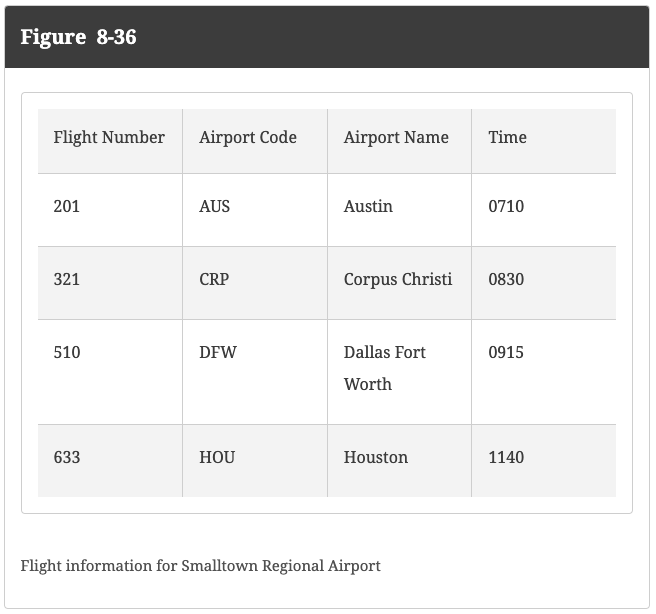
Create a GUI program named Flights that accepts either an integer flight number or string airport code (Figure 8-36 shown below). Pass the user’s entry to one of two overloaded GetFlightInfo() methods, and then display a returned string with all the flight details. The method version that accepts an integer looks up the airport code, name, and time of flight; the version that accepts a string description looks up the flight number, airport name, and time. The methods return an appropriate message if the flight is not found.
Hints:
- Use 4 parallel arrays, one for Flight Number, one for Airport Code, one for Airport Name, and one for Time.
- Use Int32.TryParse to differentiate betwee an integer or string entered as input.
Submit three things to the D2L dropbox for each lab:
1) Screenshot of your running program with data. Make sure you capture your entire desktop.
2) Screenshot of as much of your code as possible.
3) The entire project folder as a ZIP file. This folder should contain your entire project and solution.
Do NOT do the lab below. Will be removed...
Chapter 8 Exercise 7 Averages - due in one week
Write a program named Averages that includes a method that accepts any number of numeric parameters, displays them, and displays their average. Demonstrate that the method works correctly when passed one, two, or three numbers, or an array of numbers.
Submit three things to the D2L dropbox for each lab:
1) Screenshot of your running program with data. Make sure you capture your entire desktop.
2) Screenshot of as much of your code as possible.
3) The entire project folder as a ZIP file. This folder should contain your entire project and solution.